Overview
The framework brings together page objects, app-scoped enums, custom commands, schema-aware helpers, and layered reporters (Allure, JUnit, Mochawesome) so browser automation can scale without turning into a pile of disconnected specs.
It is also built to support AI-assisted development in a practical way: documented conventions, mirrored skills under `.claude/skills/` and `.cursor/skills/`, and generated Copilot agents keep outputs aligned with the framework instead of drifting from it.
What it demonstrates
- Cypress + TypeScript framework design for maintainable UI, API, and component-style testing
- Strong documentation and onboarding paths for engineers and QA contributors
- Tag-based runs with `@cypress/grep`, visual regression hooks, and CI gates on public and app-hosted targets
- AI-guided workflows built around project standards instead of ad hoc prompts
Why it belongs in the portfolio
This project shows implementation depth alongside framework thinking. It reflects how test architecture, reporting, and documentation quality all contribute to long-term automation value, not just raw test count.
AI Skills Architecture
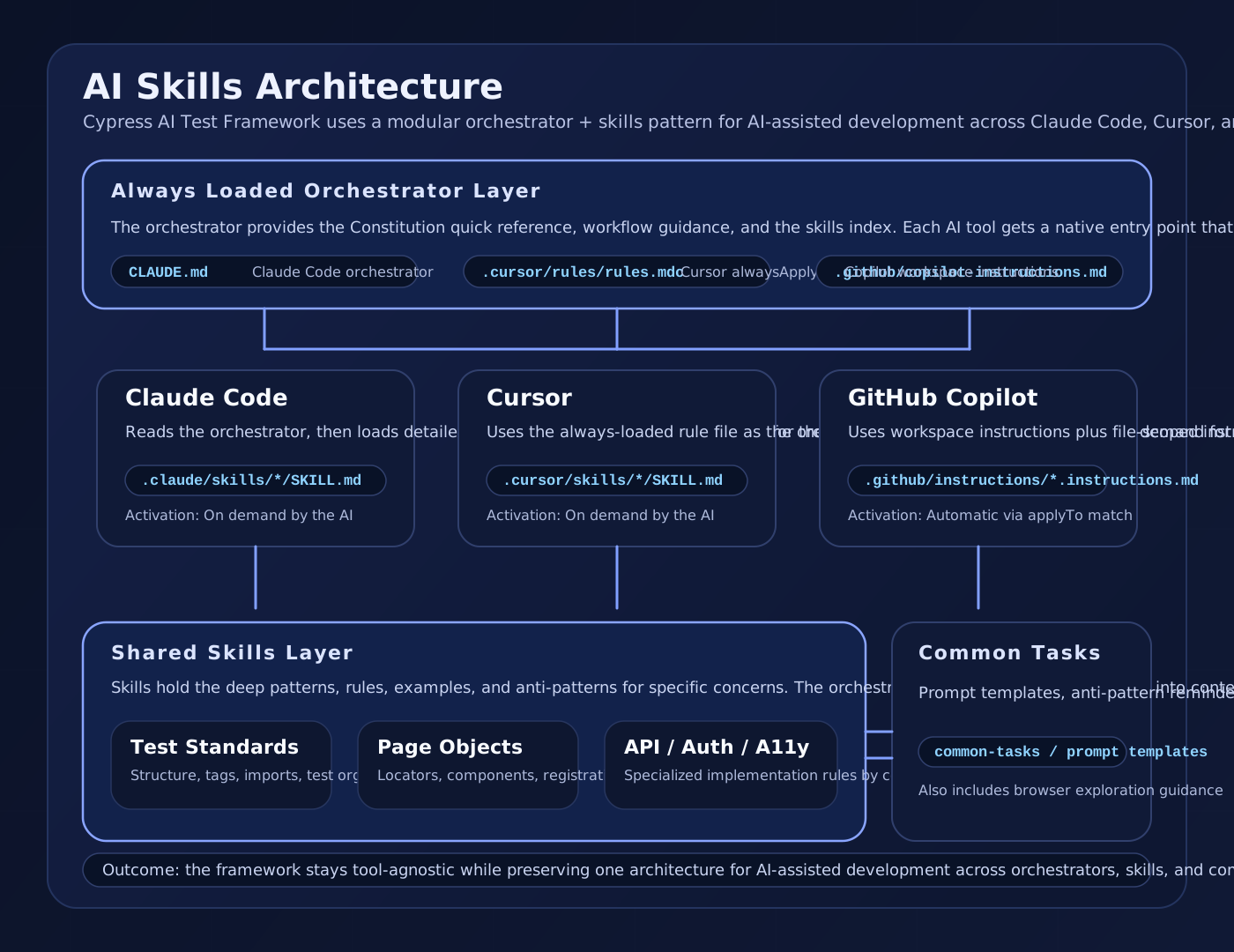
One of the framework's defining ideas is its orchestrator + skills architecture for AI-assisted development. The same core model works across Claude Code, Cursor, and GitHub Copilot, with each tool getting a native orchestrator entry point and a tool-specific instruction format.
How the model works
- The orchestrator is always loaded and provides the Constitution, workflow guidance, and skills index
- Claude Code uses `CLAUDE.md`, Cursor uses `.cursor/rules/rules.mdc`, and Copilot uses `.github/copilot-instructions.md`
- Detailed skills live in tool-specific locations so each assistant gets deeper guidance in the format it understands best
- GitHub Copilot custom agents are generated from skills via `npm run sync:github-agents` after skill edits
- Common tasks add prompt templates, anti-pattern reminders, and verification checklists for consistent generation
Why it matters
This architecture lets the project stay tool-agnostic without becoming generic. The framework keeps one mental model for AI-assisted development while still respecting the way each assistant loads and activates instructions.
AI-Assisted Development Workflow
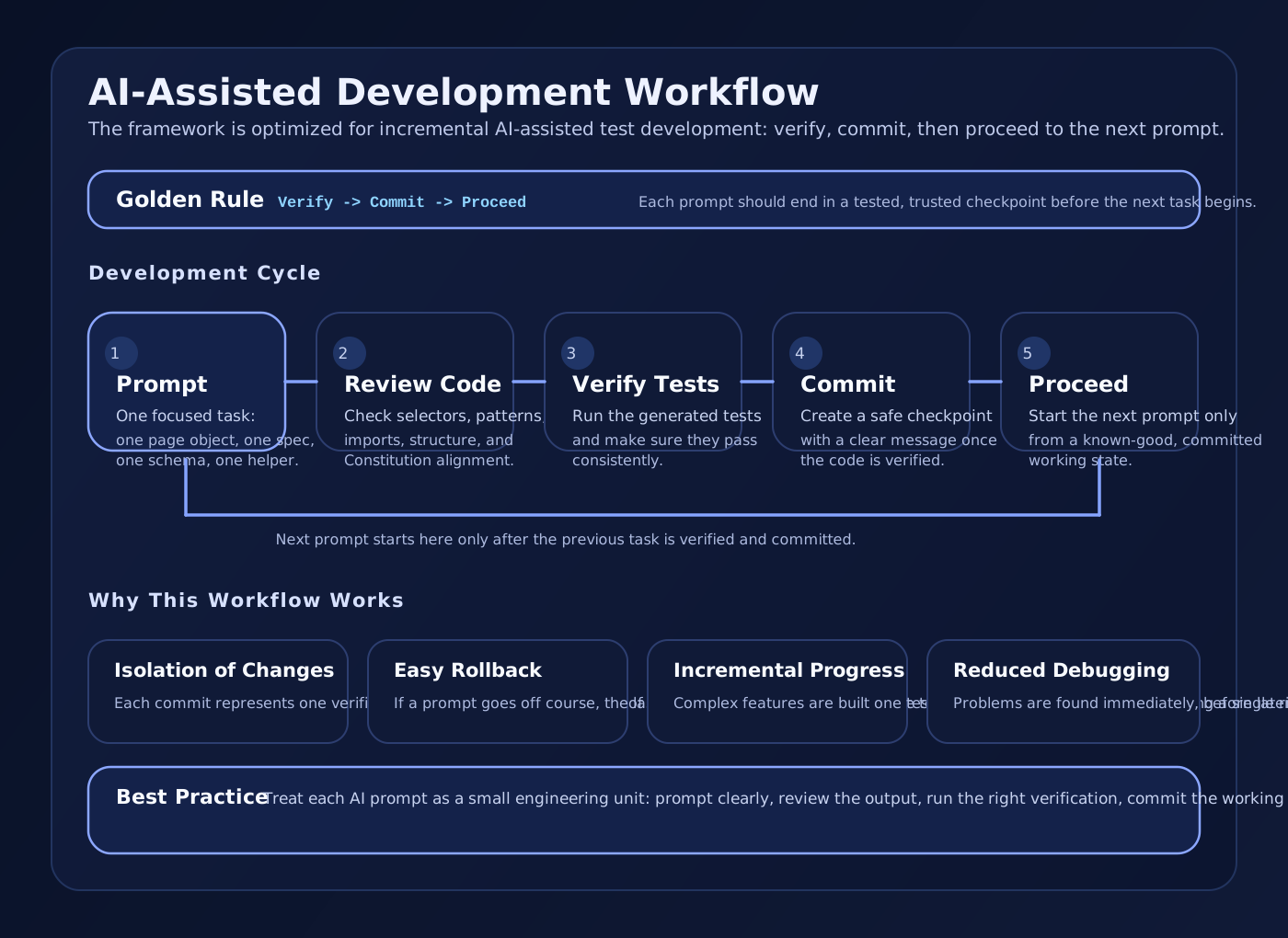
The framework is also built around an incremental development cycle for AI-assisted work: prompt one focused task, review the generated code, verify it, commit the working result, and only then move to the next prompt.
Workflow principles
- One task per prompt keeps each change small enough to review, test, and revert safely
- Generated code should be reviewed before execution so selector, structure, and pattern mistakes are caught early
- Verification protects the repository from accumulating failing or unstable code as technical debt
- Frequent commits create trusted checkpoints that future prompts can build on with less risk
Why this workflow matters
The point is not just discipline for its own sake. This pattern reduces debugging, preserves context for future AI prompts, and keeps the codebase moving forward through verified, working states instead of fragile chains of uncommitted changes.